Check an Anker power bank by matching the model printed on the device to one dated recall notice, then complete that notice’s serial-number test before following its remedy. Anker has administered several U.S. power-bank recalls with overlapping product families and different outcomes. A marketplace name, capacity, color, or order history cannot select the correct program by itself.
Last reviewed August 26, 2026. Recall forms, qualifying serial ranges, remedy availability, and disposal routes can change. Reopen the live notice before marking the device, sending documents, or moving a recalled battery.
Start with the code on the power bank, not the listing name
Disconnect the power bank and photograph its entire lower or rear label in bright light. The model is usually an A followed by four digits. Copy the serial number exactly as printed beside SN, and preserve the country of purchase, retailer, and approximate purchase date. Those fields let you separate notices that look similar in a general search.
| Evidence from the unit | How it controls the check | What cannot replace it |
|---|---|---|
| Model code | Chooses the dated notice whose product description includes that exact code | Capacity or PowerCore family name |
| Full serial number | Applies the manufacturer’s unit-level inclusion test when the notice requires one | A partial serial copied from an order page |
| Purchase market | Routes the owner to the program for the country where the unit was sold | The language of a search result |
| Device photograph | Supports transcription and any remedy evidence requested by the named program | A stock photograph of the same color |
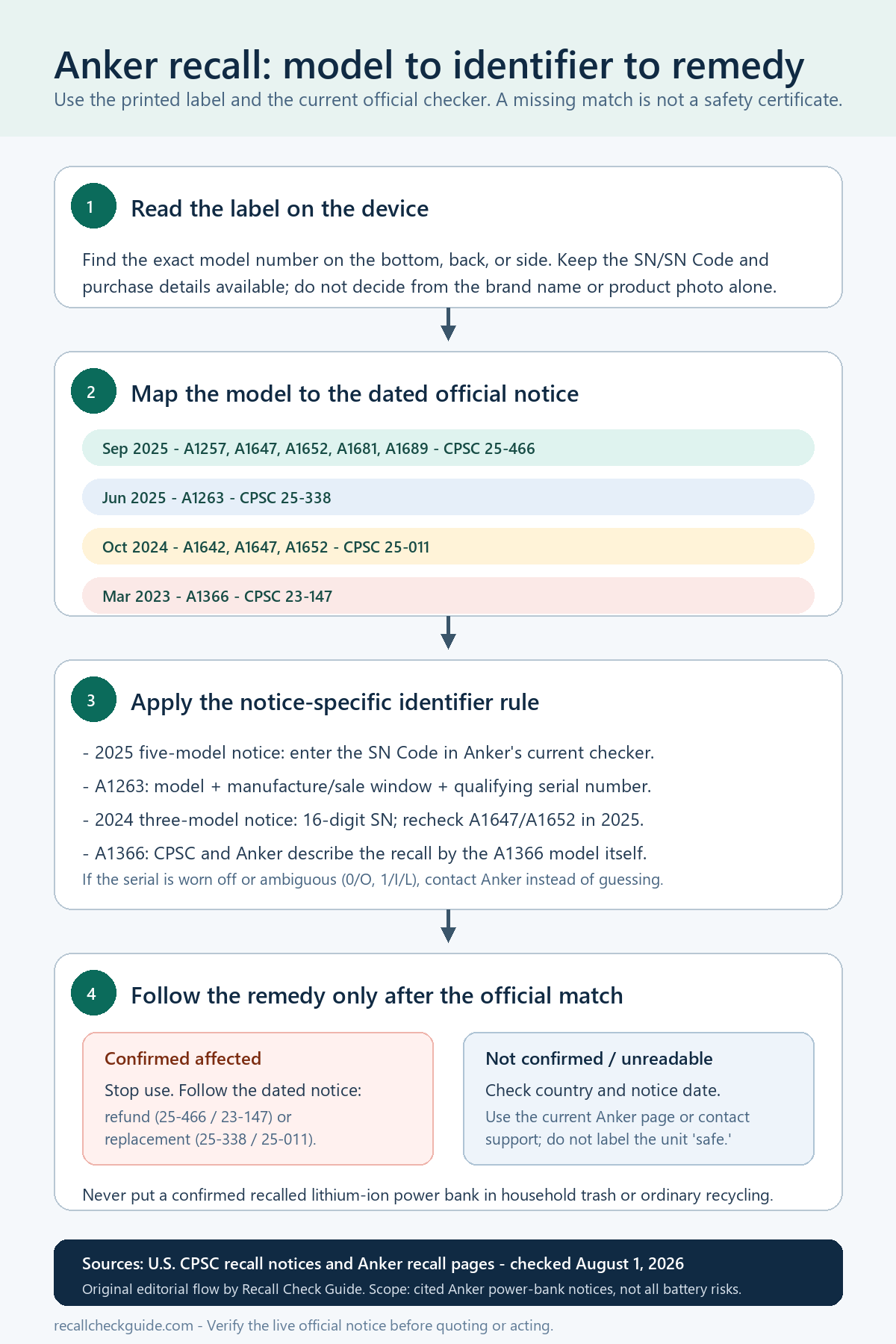
Put A1263 and the multi-model notices in separate rows
The June 2025 CPSC A1263 notice identifies Anker PowerCore 10000 model A1263 and says only qualifying serial numbers sold in the United States are included. Its listed remedy is replacement. That notice also identifies the model and SN locations on the bottom of the device.
A separate September 2025 CPSC notice covers models A1647, A1652, A1257, A1681, and A1689 and describes a refund or gift-card remedy. Do not transfer that model list or outcome to A1263. Conversely, a serial-form response for one program says nothing about a different dated notice.
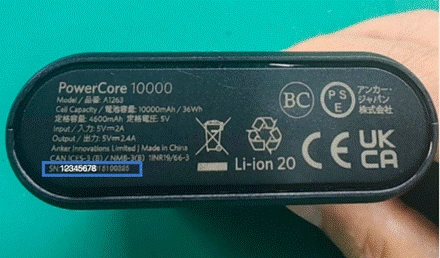
Run the identifier test from the notice you selected
- Open the dated CPSC record and verify that its product name and model code match the label photograph.
- Use the manufacturer route linked by that record or the current Anker product-recalls page.
- Enter the complete serial number from the device. Recheck easily confused characters against the photograph instead of guessing.
- Save the result screen, case number, and the exact remedy instructions returned for that program.
- Only after confirmation, prepare the device marking, proof of purchase, disposal confirmation, or other evidence named in the instructions.
The A1263 CPSC record says its replacement route requests a photograph showing the model, serial, owner’s name, photograph date, and the word recalled written on the power bank. It says a receipt is requested but is not required to participate. Another program may ask for different evidence, so read the page attached to the matching notice rather than copying this checklist.
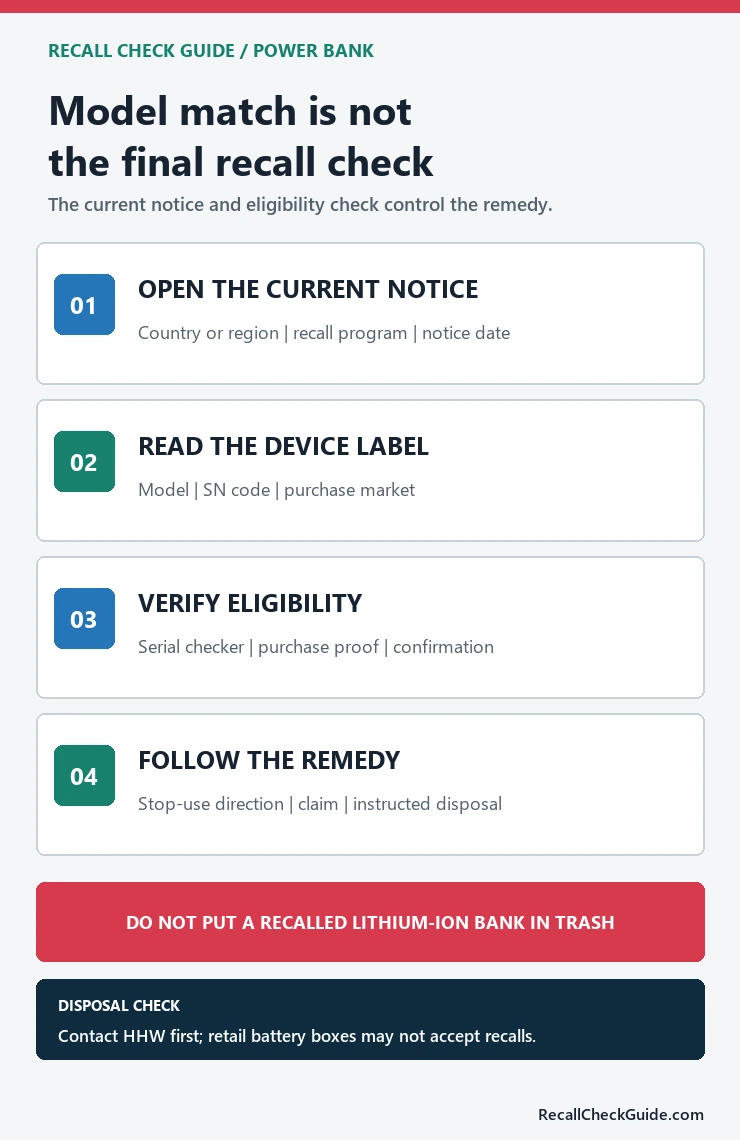
Recover a serial mismatch before choosing any remedy
If a seemingly matching unit is rejected, compare the photographed label with the form one character at a time. Confirm that the selected form belongs to the same model and purchase market. Try neither alternate characters nor another remedy form merely to obtain acceptance. When the label is worn, the form is unavailable, or two official pages appear inconsistent, preserve screenshots and use the support route linked from the current recall page.
Ask support a traceable question: identify the exact notice date, state model A1263 or the other printed model, transcribe the serial without guessing, and attach a full-label photograph plus the rejection message. Request a written explanation of the failed boundary and the next accepted evidence. A generic product photograph or marketplace order page can support ownership, but it cannot replace the device label when the program requires a qualifying serial.
A rejected entry does not establish that the power bank is outside every Anker recall. The unresolved state remains until the correct dated notice and readable identifier are paired or official support explains the mismatch. The separate battery and power bank recall check helps route other brands, while the product recall source guide covers items that belong to another regulator.
If Anker supplies a replacement unit, photograph its own model and serial before separating it from the confirmation email. The replacement is a new identity record, not proof that another power bank in the household was processed. Keep each device, submission number, and disposal instruction on its own row so a response for one unit is never reused as the remedy evidence for a second unit.
Keep the battery stationary until the remedy says where it goes
CPSC’s A1263 notice says recalled lithium-ion devices should not be placed in household trash, curbside recycling, general recycling streams, or retail used-battery boxes. Contact the municipal household hazardous-waste facility before traveling and ask whether it accepts recalled lithium-ion devices. Do not mail, puncture, dismantle, or permanently mark the unit until the applicable program tells you what to do.
Finish with a compact case file: device-label photographs, dated notice, serial result, support correspondence, remedy confirmation, and disposal or replacement record. If the promised remedy is delayed, use the route named in that notice and compare the outcome with the recall remedy check. This page explains the matching process; it cannot decide an individual unit’s inclusion or substitute for the current CPSC and Anker records.