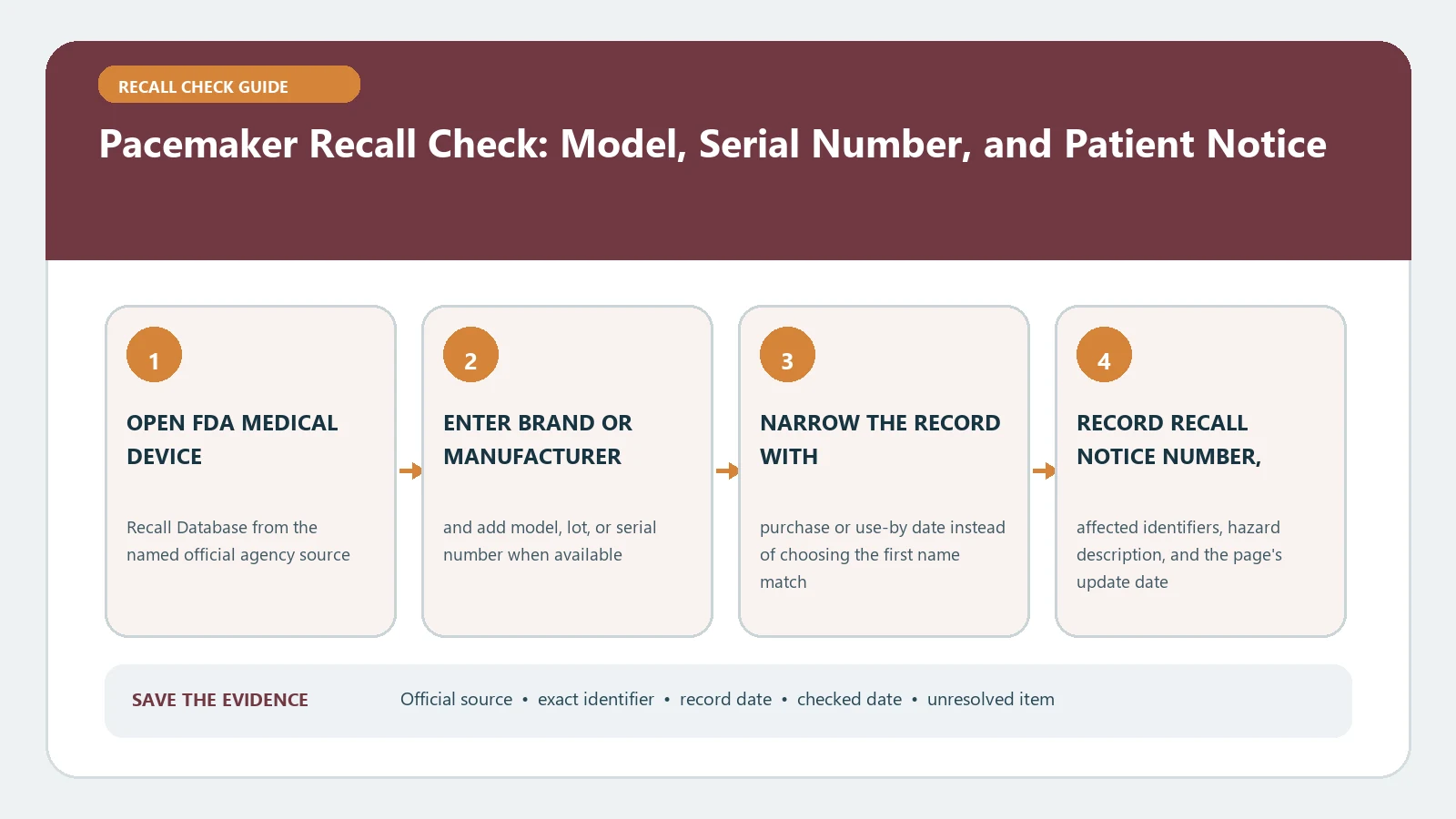
There is no public FDA tool that clears an implanted pacemaker by serial number alone. Start with the patient device card or clinic record, identify the manufacturer and model, find the exact FDA recall notice, and then have the treating device clinic or manufacturer confirm the model-and-serial combination. AccessGUDID can identify a device model, but it does not store individual serial numbers. Do not stop monitoring, change treatment, or seek device removal because of an online result.
Last checked August 26, 2026. Medical-device notices and manufacturer instructions can change. Reopen the FDA Medical Device Recall database and the detailed notice before a clinical decision.
Begin with the implant record, not the search box
A pacemaker serial number is an individual device identifier and should come from a reliable patient record. The wallet card, implant report, clinic chart, or device-interrogation record may show the maker, commercial name, model or catalog number, and serial number. Copy the characters exactly. Do not post a full serial number on a public forum or send it to an address that did not come from the clinic, FDA notice, or manufacturer route linked by FDA.
- Patient name and date of birth belong in the clinic conversation, not in a public recall search.
- Manufacturer and model narrow the correct FDA record; a product family name may cover several models.
- The serial number determines the individual unit only when the recall program uses a serial-specific list or checker.
- The implant date and clinic record help resolve a missing card, but they do not substitute for a required serial match.
Model, UDI, and serial number answer different questions
| Identifier or record | What it can establish | Important limit |
|---|---|---|
| Model or catalog number | The device version or family | Every unit of that model may not be in the action |
| UDI device identifier (DI) | Labeler and specific device version or model | It is not the patient’s individual serial number |
| Serial number / production identifier | One manufactured unit | A public FDA model database does not store it for patient lookup |
| FDA recall record | Affected product scope, reason, status, and action | It may direct the final unit check to the clinic or manufacturer |
FDA’s UDI Basics separates the fixed device identifier from production identifiers such as lot, serial, expiration, and manufacture date. The same page says GUDID contains only the device identifier, not the production identifier. That distinction prevents a model lookup from being mistaken for a patient-specific recall result.
Search the FDA record in two passes
- Confirm the manufacturer, model or catalog number, and serial number from the implant card or clinic record.
- Search FDA Medical Device Recalls by the manufacturer and product or model. Open the detailed record instead of stopping at the result list.
- Compare product name, model or catalog numbers, recalling firm, recall initiation date, reason, and the FDA action or status.
- Open the linked FDA safety communication or recall notice when one exists; it may have newer patient and clinician instructions than the short database row.
- If the notice says only certain serial numbers are affected, use the manufacturer checker or contact route linked by FDA, or ask the device clinic to run the check.
- Record who confirmed the result, the notice title and date, model, a masked serial reference, and the next clinical action.
The first pass finds the correct recall action. The second pass decides whether the implanted unit is in its affected population. A general search for “pacemaker recall” can find the wrong manufacturer or an older correction. A serial entry without a verified model can be equally misleading because manufacturers can reuse numbering formats across product lines.
AccessGUDID identifies the model, not the patient unit
The National Library of Medicine’s AccessGUDID explanation says the database contains only the device identifier. Production identifiers—including serial numbers—are not submitted to or stored in GUDID, although the record can indicate which kinds of production identifiers appear on the label. AccessGUDID is useful when you have a UDI-DI or need to confirm the company and device version. It cannot return an individual patient’s recall status.
For an implanted pacemaker, the original package label may no longer be available. That makes the device card and clinical record more important than a consumer barcode scan. If the card and clinic record disagree, do not pick the value that produces a result; ask the clinic to reconcile the implant record.
Four result states keep uncertainty visible
| Result state | What you know | Who should close the gap |
|---|---|---|
| Confirmed affected unit | The exact model and serial combination is included | Treating device clinic follows the notice and patient-specific plan |
| Model listed, serial unresolved | The family is involved but the individual unit is not confirmed | Clinic or manufacturer checks the serial through the official route |
| Not included by the official unit check | That model/serial was not in the named action at the check time | Clinic records the result and watches for notice updates |
| No reliable result | Identifiers, notice, or checker are missing or conflicting | Clinic and manufacturer reconcile the record; do not infer clearance |
A database no-result means only that the query did not return a classified FDA recall record in that form. The record may use a different product name, manufacturer name, or model family, and a new correction may not yet be classified. State the unresolved field instead of writing “not recalled.”
A current FDA example shows why the model is not enough
FDA’s Accolade-family pacemaker recall page lists product names, model numbers, and GTINs, then warns that those attributes are not sufficient to identify devices in the advisory population. FDA directs patients and health professionals to a manufacturer lookup using the model and serial combination. The page also gives clinician instructions and notes that general prophylactic replacement is not recommended for that action.
That is an example of one recall, not a rule that every pacemaker program uses the same checker or treatment. Follow the identification and clinical instructions in the exact notice that matches the implanted device. Do not reuse the Accolade tool for another company or product family.
A recall is not automatically an explant order
The FDA page What Is a Medical Device Recall? explains that a recall may be a correction or a removal and does not always require stopping use or returning a device. Actions can include inspection, repair, adjustment, relabeling, patient notification, or monitoring. For an implanted device, the risk of removal must be considered against the risk of leaving it in place.
Online matching should therefore end in a clinician conversation, not a treatment instruction. Contact the device clinic promptly when a notice may apply. If there are urgent symptoms or a device alert, seek medical care through the patient’s established emergency plan rather than waiting for a database search or website reply.
If the serial number or original clinic is unavailable
Call the current cardiology or electrophysiology clinic first. Ask for the implanted-device manufacturer, model, serial number, implant date, and the most recent interrogation record. If the original practice closed, request the implant report from the hospital or health system’s medical-records department. The current clinic can also identify the device during follow-up and contact the manufacturer’s clinical support route.
When an FDA notice provides a manufacturer number or lookup link, use that route and keep the case reference. Avoid a generic web form, used-device seller, or third-party serial database. If a manufacturer says the serial is invalid, confirm the model, character count, and transcription with the clinic rather than trying variants until one is accepted.
Keep one record for the clinic conversation
| Detail to save | What to save |
|---|---|
| Device identity | Manufacturer, exact model, and a masked serial ending; keep the full serial in the medical record |
| Official action | FDA recall number or detailed page, date, affected range, and current status |
| Unit confirmation | Clinic or manufacturer, date checked, case reference, and exact outcome wording |
| Clinical next step | Monitoring, appointment, programming, or other instruction given by the treating team |
| Recheck trigger | New FDA update, manufacturer letter, device alert, or scheduled clinic review |
This record separates public evidence from patient-specific advice. It also makes a later update understandable: the FDA notice may change while the implanted model and serial remain the same. A screenshot without the notice date, serial-check source, or clinician response cannot show which conclusion was actually reached.
Use the broader device and remedy pages only when needed
For FDA database fields outside pacemakers, use the medical-device recall check. If the notice describes a correction, replacement, or another remedy, read the recall remedy comparison after the clinic identifies the applicable action. Those pages cannot confirm an implanted serial number or replace the treating team.