Use Recalls.gov to choose the responsible federal agency, not to run one universal product search. Select the product category, open the agency’s live database, and match the item’s model, VIN, lot, UPC, date code, or other controlling identifiers there. A route from Recalls.gov is not itself proof that a product is affected or clear.
Reviewed August 26, 2026. Federal databases have different scopes, update schedules, search fields, and historical limits. Save the destination agency and date checked rather than writing only Recalls.gov in the result record.
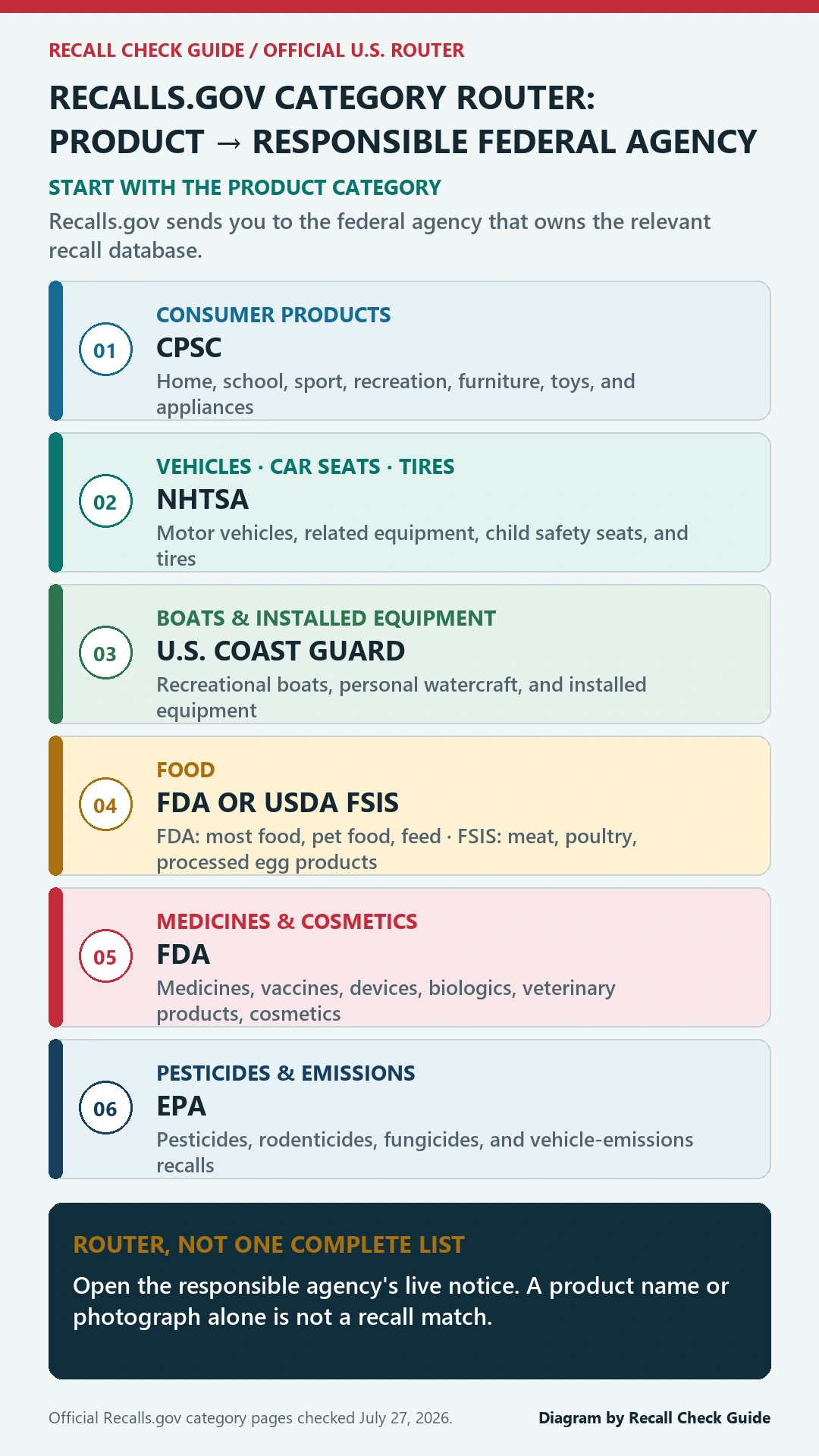
Choose the regulated category before the brand
Start at Recalls.gov and identify what the item is, not where it was purchased. A supermarket can sell food, medicine, cosmetics, appliances, toys, and vehicle equipment governed by different systems. A manufacturer can make both CPSC consumer products and NHTSA-regulated vehicle equipment. Retailer and brand names are useful after ownership has been assigned.
Write one sentence that names the object and its use: packaged ground beef, infant formula, prescription tablets, a child car seat, a replacement tire, a countertop appliance, or a pesticide. If two regulated objects are bundled, split them. An e-bike and an aftermarket helmet, or a vehicle and a child seat installed inside it, may require separate searches.
Each destination owns a different record
| Product question | Federal destination | Typical decisive input |
|---|---|---|
| Household product, toy, appliance, furniture | CPSC recalls and warnings | Model, serial, date code, configuration |
| Vehicle, tire, child seat, vehicle equipment | NHTSA recall lookup | VIN, license plate, model, equipment identity |
| FDA-regulated food, drug, device, cosmetic | FDA recalls and safety alerts | Lot, UPC, NDC, model, catalog, distribution |
| Meat, poultry, processed egg product | USDA FSIS recalls | Establishment number, lot, date, package |
The table is an ownership map, not a complete list of every category. Boats, environmental products, and other specialized items follow the additional federal routes shown on Recalls.gov. Once the responsible source opens, use that source’s description and limits. Do not carry a search result from one agency into a category it does not regulate.
Keep the label intact during the handoff
Before leaving the router, photograph the product and package. Preserve the manufacturer or importer, complete model, serial, lot, UPC, date code, size, strength, VIN, tire identification, establishment number, and purchase record as applicable. The receiving database may call the same field by a different name, but that does not make fields interchangeable.
Search with the most distinctive identifier first, then widen to company and product description. Open the full notice. Compare every stated condition, including package variation, production window, geography, retailer, or software version. A photograph can confirm appearance after an identifier match; it rarely replaces the code printed on the item.
Mixed products need more than one agency check
A prepared meal may contain USDA-regulated meat while another packaged food falls under FDA. A child seat uses NHTSA even when purchased from a toy retailer. A portable refrigerator is generally a consumer product, while food stored inside follows its own food-safety notice. Divide the household situation into regulated objects and create a separate evidence row for each.
- Name the object and category without relying on the seller department.
- Open the agency route supplied for that category.
- Match the agency-specific identifiers and affected population.
- Save the hazard, consumer action, remedy, and official notice URL.
- Repeat for every distinct product or component in the bundle.
The consumer-product guide, vehicle recall guide, and FDA list guide continue the workflow after the router has assigned ownership.
When the agency route returns no result
Return to the category choice and test whether the item was misclassified. Then check spelling, label company, importer, private-label relationship, and code formatting. Search the destination by both exact identifier and broader description. Old records may use a former company name, while a newly announced action may not yet appear across every interface.
Record each search attempt, including the category selected and the identifier entered. That short trail reveals whether the gap comes from ownership, identity, or affected-population evidence and prevents the same unproductive query from being repeated later.
Do not switch to a different agency merely because its search is easier. If ownership is still unclear, contact the agency responsible for the likely category and describe the item without claiming a match. For products sold outside the United States, use the regulator for that market; the Canada product recall guide is a separate national workflow, not an extension of the U.S. router.
Name the agency in the saved result
A reproducible record says CPSC notice and recall number, NHTSA VIN result and campaign, FDA event or announcement, or USDA FSIS notice. It includes the exact identifiers entered, affected fields compared, check date, consumer action, and remedy status. Writing only no result on Recalls.gov hides which database was searched and makes later rechecking impossible.
Use affected when every controlling condition matches, excluded when a decisive condition differs, and unresolved when identity, scope, or database ownership remains uncertain. Keep remedy completion as a later field. Reporting an incident or complaint is also separate from joining the recall program.
What the federal router cannot prove
Recalls.gov cannot certify a product’s safety, show that every federal or manufacturer action has been found, diagnose harm, or guarantee a refund. Its value is preventing the first search from landing in the wrong system. Use it to reach the owner, then let the owner’s live notice and the item’s exact identifiers control the conclusion. Save that source path and recheck when the product is reused, transferred, resold, or a remedy remains unfinished.